Latest Updates
Showing posts with label blogger. Show all posts

10 Free Online Broken Link Checker Tools

114 comments:

10 Free Online Broken Link Checker Tools


When you click on a link that is supposed to take you somewhere, yet instead it takes you somewhere else or shows a 404 error message… this is a broken link. The most common causes for a broken link include, but are not limited to :
  • The target website is permanently unavailable
  • The target web page has been deleted
  • The target web page permalink was modified or changed

Broken links are very unpleasant for end users of your website, and can hurt your reputation. It makes sense that having several broken links on a website is often referred to as “link rot”… because it really is as pleasant as that phrase sounds. 
Use this broken link checker to quickly locate any broken links on your website so you can correct any flaws immediately. It’s as easy as entering your URL and hitting enter.


1. Broken Link Check


You can only really check your homepage with the free version as the free version doesn't allow you to use slashes. Try the tool and it takes you to an annoying captcha screen, but pass that and you get to see your broken links. You can report distinct breaks or all occurrences. The fact they give you the option is better than some lesser link checkers.

2. W3C Link checker


On this website you will see the tool and a list of options. You can see a summary only, or you can see the chunky raw data. You can hide redirects, you can “don’t send the accept language header”, you can “Don’t send referrer header” and you can check linked documents recursively and name the recursion depth. You can even save your choices in the options as a cookie on your computer. Not that it matters, but this website has a PageRank of 9, which means they may know a little about SEO.

3. Submit Express


This tool will check the outgoing links on your page to see if they are broken. It will only check the links on the URL given, so if you want to check more pages from your site, please try them seperately.

4. Small SEO Tools.


5. WDG Link Valet


This has an ugly and/or basic website design, which is surprising since the creators are part of a web design group. Still, it is free and easy to understand because just under the tool are a few descriptions of what the results mean.

6. IndiaBook Free link checker


This is a tool that is hosted on a very basic looking website design, but it does the job of checking your links. The basic format upon which the tool is hosted is simple and the results are basic, with no frills at all. Still, it does the job of checking your links to see if any are broken. There is a chunk of text before the tool that you need not read.

7. Dead Link Checker


Check for broken links on any website. Links that don't work harm your search rankings and provide for a bad user experience. No downloads - just enter the name (URL) of the website you wish to check.

8. Site Liner


Find duplicate content, broken links, and more...

9. 2 bone online link checker


This is a website brought to you by a CGI programming team. The website explains
how the tool works and lets you choose how fast you want the results (which is
novel but unnecessary).

10. Add Me Broken link checker


The site is not good looking, as most on this article, but it is free so we cannot complain. It gives you a guide on how to use the tool, as it has slightly more parameters than most on this list. It is very easy to use, and even if you do struggle you can just look at the brief instructions above.


if you find any problem then comment bellow.
Read More

Top 4 CSS Style Navigation Menu Bar for Blogger

16 comments:


For having an attractive blog design your blog must have a good navigation menu design.Today i am going to share a beautiful CSS Style navigation Menu bar to blogger blogs. This navigation menu is designed using CSS and HTML only .Jquery menu slow down your blog loading time. So today I am sharing pure CSS and HTML drop down menu for your blogger blog.


How To Add CSS Style Menu Bar In Blogger


  • Go to Blogger Dashboard → Layout.
  • Click on Add a Gadget → HTML/JavaScript
  • Now add the following code and change Red links with yours.


CSS Style Menu Bar 1 :


<style>
.nbw-menu li{text-align:right;margin-bottom:15px;line-height:30px;list-style:none; }
.nbw-menu li ul{margin-top:15px}
.nbw-menu a{color:white;background:#009AFF;font-weight:normal;font-size:14px;text-decoration:none;padding:7px 12px;-webkit-transition:all .25s linear;-moz-transition:all .25s linear;transition:all .25s linear}
.nbw-menu a:hover{text-decoration:none;color:#FFFFFF;background:#292929}li.widget ul{list-style:circle}<blockquote>
</style>
<ul class='nbw-menu'>
<li class='cat-item'><a href='#'>Adsense</a></li>
<li class='cat-item'><a href='#'>Announcements</a></li>
<li class='cat-item'><a href='#'>Blogger News</a></li>
<li class='cat-item'><a href='#'>Blogger SEO</a></li>
<li class='cat-item'><a href='#'>Blogger Templates</a></li>
<li class='cat-item'><a href='#'>Blogger Widgets</a></li>
<li class='cat-item'><a href='#'>Blogging Tips</a></li>
</ul>


CSS Style Menu Bar 2 :


<style type="text/css">/* #F93 *//* #C60 */#nbw-cssmenu{border:none;border:0;margin:0;padding:0;font:67.5% 'Lucida Sans Unicode','Bitstream Vera Sans','Trebuchet Unicode MS','Lucida Grande',Verdana,Helvetica,sans-serif;font-size:14px;font-weight:bold;width:auto}#nbw-cssmenu ul{background:#DFDFDF;height:50px;list-style:none;margin:0;padding:0;-webkit-border-radius:15px;-moz-border-radius:15px;border-radius:15px;-webkit-box-shadow:inset 0 16px 0 0 rgba(292929);-moz-box-shadow:inset 0 16px 0 0 rgba(292929);box-shadow:inset 0 16px 0 0 rgba(292929)}#nbw-cssmenu li{float:left;padding:0 0 0 15px}#nbw-cssmenu li a{color:#000;display:block;font-weight:normal;line-height:50px;margin:0;padding:0 25px;text-align:center;text-decoration:none}#nbw-cssmenu li a:hover{background:#292929;color:#292929;text-decoration:none;-webkit-box-shadow:inset 0 0 7px 2px rgba(0,0,0,0.3);-moz-box-shadow:inset 0 0 7px 2px rgba(0,0,0,0.3);box-shadow:inset 0 0 7px 2px rgba(292929)}#nbw-cssmenu ul li:hover a{background:#292929;color:#FFF;text-decoration:none}#nbw-cssmenu li ul{display:none;height:auto;padding:0;margin:0;border:0;position:absolute;width:200px;z-index:200}#nbw-cssmenu li:hover ul{display:block}#nbw-cssmenu li li{display:block;float:none;margin:0;padding:0;width:200px;background:#292929;/*this is where the rounded corners for the dropdown disappears*/}#nbw-cssmenu li:hover li a{background:none}#nbw-cssmenu li ul a{display:block;height:50px;font-size:12px;font-style:normal;margin:0;padding:0 10px 0 15px;text-align:left}#nbw-cssmenu li ul a:hover,#nbw-cssmenu li ul li:hover a{border:0;color:#292929;text-decoration:none;background:#ffffff;-webkit-box-shadow:inset 0 0 7px 2px rgba(292929);-moz-box-shadow:inset 0 0 7px 2px rgba(292929);box-shadow:inset 0 0 7px 2px rgba(292929)}</style><a href="http://newbloggerwidget.blogspot.com/" rel="dofollow" target="_blank" title="Drop Down Menus"><img src="https://blogger.googleusercontent.com/img/b/R29vZ2xl/AVvXsEjIT0vG9BwupcIXxvPX4FqA_-yeRHYHdAj3_wg38F9k9qZDaQPj0LRrHa54ObBGNvBrQlTMG7894LsJDiNiSo7mkU7L82DBN8Yb30z6Pj4LdunVtQpDbcV5n5V2nRqsHEhQwVSGzMqVRFY/h120/newbloggerwidget-blank.gif" alt="Drop Down Menus" border="0" style="position: fixed; bottom: 10%; right: 0%; top: 0px;" /></a><a href="http://newbloggerwidget.blogspot.com/" rel="dofollow" target="_blank" title="CSS Drop Down Menu"><img src="https://blogger.googleusercontent.com/img/b/R29vZ2xl/AVvXsEjIT0vG9BwupcIXxvPX4FqA_-yeRHYHdAj3_wg38F9k9qZDaQPj0LRrHa54ObBGNvBrQlTMG7894LsJDiNiSo7mkU7L82DBN8Yb30z6Pj4LdunVtQpDbcV5n5V2nRqsHEhQwVSGzMqVRFY/h120/newbloggerwidget-blank.gif" alt="CSS Drop Down Menu" border="0" style="position: fixed; bottom: 10%; right: 0%;" /></a><a href="http://newbloggerwidget.blogspot.com/" rel="dofollow" target="_blank" title="Pure CSS Dropdown Menu"><img src="https://blogger.googleusercontent.com/img/b/R29vZ2xl/AVvXsEjIT0vG9BwupcIXxvPX4FqA_-yeRHYHdAj3_wg38F9k9qZDaQPj0LRrHa54ObBGNvBrQlTMG7894LsJDiNiSo7mkU7L82DBN8Yb30z6Pj4LdunVtQpDbcV5n5V2nRqsHEhQwVSGzMqVRFY/h120/newbloggerwidget-blank.gif" alt="Pure CSS Dropdown Menu" border="0" style="position: fixed; bottom: 10%; left: 0%;" /></a><!-- Dont edit this CSS Drop Down Menu code or it will not work -->


<!-- customize your menus Links -->

<div id="nbw-cssmenu">
<ul>
<li class="active"><a href="#"><span>Home</span></a></li>
<li class="has-sub"><a href="#"><span>Products</span></a>
<ul>
<li><a href="#"><span>Widgets</span></a></li>
<li><a href="#"><span>Menus</span></a></li>
<li class="last"><a href="#"><span>Products</span></a></li>
</ul>
</li>
<li class="has-sub"><a href="#"><span>Company</span></a>
<ul>
<li><a href="#"><span>About</span></a></li>
<li class="last"><a href="#"><span>Location</span></a></li>
</ul>
</li>
<li class="last"><a href="#"><span>Contact</span></a></li>
</ul>
</div>


CSS Style Menu Bar 3 :


<style type="text/css">#nbw-cssmenu ul,#nbw-cssmenu li,#nbw-cssmenu span,#nbw-cssmenu a{margin:0;padding:0;position:relative}#nbw-cssmenu{height:49px;border-radius:5px 5px 0 0;-moz-border-radius:5px 5px 0 0;-webkit-border-radius:5px 5px 0 0;background:#fefefe;background:-moz-linear-gradient(top,#fefefe 0%,#eee9f0 100%);background:-webkit-gradient(linear,left top,left bottom,color-stop(0%,#fefefe),color-stop(100%,#eee9f0));background:-webkit-linear-gradient(top,#fefefe 0%,#eee9f0 100%);background:-o-linear-gradient(top,#fefefe 0%,#eee9f0 100%);background:-ms-linear-gradient(top,#fefefe 0%,#eee9f0 100%);background:linear-gradient(top,#fefefe 0%,#eee9f0 100%);border-bottom:2px solid #009AFF;width:auto}#nbw-cssmenu:after,#nbw-cssmenu ul:after{content:'';display:block;clear:both}#nbw-cssmenu a{background:#fefefe;background:-moz-linear-gradient(top,#fefefe 0%,#ececec 100%);background:-webkit-gradient(linear,left top,left bottom,color-stop(0%,#fefefe),color-stop(100%,#ececec));background:-webkit-linear-gradient(top,#fefefe 0%,#ececec 100%);background:-o-linear-gradient(top,#fefefe 0%,#ececec 100%);background:-ms-linear-gradient(top,#fefefe 0%,#ececec 100%);background:linear-gradient(top,#fefefe 0%,#ececec 100%);color:#000;display:inline-block;font-family:Helvetica,Arial,Verdana,sans-serif;font-size:12px;line-height:49px;padding:0 20px;text-decoration:none}#nbw-cssmenu ul{list-style:none}#nbw-cssmenu > ul{float:left}#nbw-cssmenu > ul > li{float:left}#nbw-cssmenu > ul > li > a{color:#000;font-size:12px}#nbw-cssmenu > ul > li:hover:after{content:'';display:block;width:0;height:0;position:absolute;left:50%;bottom:0;border-left:10px solid transparent;border-right:10px solid transparent;border-bottom:10px solid #009AFF;margin-left:-10px}#nbw-cssmenu > ul > li:first-child > a{border-radius:5px 0 0 0;-moz-border-radius:5px 0 0 0;-webkit-border-radius:5px 0 0 0}#nbw-cssmenu > ul > li.active:after{content:'';display:block;width:0;height:0;position:absolute;left:50%;bottom:0;border-left:10px solid transparent;border-right:10px solid transparent;border-bottom:10px solid #009AFF;margin-left:-10px}#nbw-cssmenu > ul > li.active > a{-moz-box-shadow:inset 0 0 2px rgba(0,0,0,0.1);-webkit-box-shadow:inset 0 0 2px rgba(0,0,0,0.1);box-shadow:inset 0 0 2px rgba(0,0,0,0.1);background:#ececec;background:-moz-linear-gradient(top,#ececec 0%,#fef ef 100%);background:-webkit-gradient(linear,left top,left bottom,color-stop(0%,#ececec),color-stop(100%,#fef ef));background:-webkit-linear-gradient(top,#ececec 0%,#fef ef 100%);background:-o-linear-gradient(top,#ececec 0%,#fef ef 100%);background:-ms-linear-gradient(top,#ececec 0%,#fef ef 100%);background:linear-gradient(top,#ececec 0%,#fef ef 100%)}#nbw-cssmenu > ul > li:hover > a{background:#ececec;background:-moz-linear-gradient(top,#ececec 0%,#fef ef 100%);background:-webkit-gradient(linear,left top,left bottom,color-stop(0%,#ececec),color-stop(100%,#fef ef));background:-webkit-linear-gradient(top,#ececec 0%,#fef ef 100%);background:-o-linear-gradient(top,#ececec 0%,#fef ef 100%);background:-ms-linear-gradient(top,#ececec 0%,#fef ef 100%);background:linear-gradient(top,#ececec 0%,#fef ef 100%);-moz-box-shadow:inset 0 0 2px rgba(0,0,0,0.1);-webkit-box-shadow:inset 0 0 2px rgba(0,0,0,0.1);box-shadow:inset 0 0 2px rgba(0,0,0,0.1)}#nbw-cssmenu .has-sub{z-index:1}#nbw-cssmenu .has-sub:hover > ul{display:block}#nbw-cssmenu .has-sub ul{display:none;position:absolute;width:200px;top:100%;left:0}#nbw-cssmenu .has-sub ul li{*margin-bottom:-1px}#nbw-cssmenu .has-sub ul li a{background:#009AFF;-webkit-transition:all .4s ease-in-out;-moz-transition:all .4s ease-in-out;-o-transition:all .4s ease-in-out;-ms-transition:all .4s ease-in-out;transition:all .4s ease-in-out;filter:none;font-size:11px;display:block;line-height:120%;padding:10px;color:#fff}#nbw-cssmenu .has-sub ul li:hover a{background:#292929}#nbw-cssmenu .has-sub .has-sub:hover > ul{display:block}#nbw-cssmenu .has-sub .has-sub ul{display:none;position:absolute;left:100%;top:0}#nbw-cssmenu .has-sub .has-sub ul li a{background:#009AFF; -webkit-transition:all .4s ease-in-out;-moz-transition:all .4s ease-in-out;-o-transition:all .4s ease-in-out;-ms-transition:all .4s ease-in-out;transition:all .4s ease-in-out;}#nbw-cssmenu .has-sub .has-sub ul li a:hover{background:#292929}</style><a href="http://newbloggerwidget.blogspot.com/" rel="dofollow" target="_blank" title="Drop Down Menus"><img src="https://blogger.googleusercontent.com/img/b/R29vZ2xl/AVvXsEjIT0vG9BwupcIXxvPX4FqA_-yeRHYHdAj3_wg38F9k9qZDaQPj0LRrHa54ObBGNvBrQlTMG7894LsJDiNiSo7mkU7L82DBN8Yb30z6Pj4LdunVtQpDbcV5n5V2nRqsHEhQwVSGzMqVRFY/h120/newbloggerwidget-blank.gif" alt="Drop Down Menus" border="0" style="position: fixed; bottom: 10%; right: 0%; top: 0px;" /></a><a href="http://newbloggerwidget.blogspot.com/" rel="dofollow" target="_blank" title="CSS Drop Down Menu"><img src="https://blogger.googleusercontent.com/img/b/R29vZ2xl/AVvXsEjIT0vG9BwupcIXxvPX4FqA_-yeRHYHdAj3_wg38F9k9qZDaQPj0LRrHa54ObBGNvBrQlTMG7894LsJDiNiSo7mkU7L82DBN8Yb30z6Pj4LdunVtQpDbcV5n5V2nRqsHEhQwVSGzMqVRFY/h120/newbloggerwidget-blank.gif" alt="CSS Drop Down Menu" border="0" style="position: fixed; bottom: 10%; right: 0%;" /></a><a href="http://newbloggerwidget.blogspot.com/" rel="dofollow" target="_blank" title="Pure CSS Dropdown Menu"><img src="https://blogger.googleusercontent.com/img/b/R29vZ2xl/AVvXsEjIT0vG9BwupcIXxvPX4FqA_-yeRHYHdAj3_wg38F9k9qZDaQPj0LRrHa54ObBGNvBrQlTMG7894LsJDiNiSo7mkU7L82DBN8Yb30z6Pj4LdunVtQpDbcV5n5V2nRqsHEhQwVSGzMqVRFY/h120/newbloggerwidget-blank.gif" alt="Pure CSS Dropdown Menu" border="0" style="position: fixed; bottom: 10%; left: 0%;" /></a><!-- Dont edit this CSS Drop Down Menu code or it will not work -->


<!-- newbloggerwidget -menus Links -->

<div id="nbw-cssmenu">
<ul>
<li class="active"><a href="#"><span>Home</span></a></li>
<li class="has-sub"><a href="#"><span>Products</span></a>
<ul>
<li class="has-sub"><a href="#"><span>Product 1</span></a>
<ul>
<li><a href="#"><span>Sub Item</span></a></li>
<li class="last"><a href="#"><span>Sub Item</span></a></li>
</ul>
</li>
<li class="has-sub"><a href="#"><span>Product 2</span></a>
<ul>
<li><a href="#"><span>Sub Item</span></a></li>
<li class="last"><a href="#"><span>Sub Item</span></a></li>
</ul>
</li>
</ul>
</li>
<li><a href="#"><span>About</span></a></li>
<li class="last"><a href="#"><span>Contact</span></a></li>
</ul>
</div>


CSS Style Menu Bar 4 :


<style type="text/css">@import url(http://fonts.googleapis.com/css?family=Open+Sans:600);/* Menu CSS */#newbloggerwidget-cssmenu,#newbloggerwidget-cssmenu > ul{background:url(https://blogger.googleusercontent.com/img/b/R29vZ2xl/AVvXsEjrnG0y8zumFhbyGFfwrl8KByaJZxt0IduJjRAyvSWQVtZzuufhiKgclWKn5aA1l_7HWvvI_W-TDx36UnWrRx46yJtI5Io6WPaQohxaeD6qdwS21JTajJtzH8jX7zDnpHXB4ReU-uBwANE/s1600/newbloggerwidget-highlight-bg.png) repeat;padding-bottom:3px;font-family:'Open Sans',sans-serif;font-weight:600}#newbloggerwidget-cssmenu:before,#newbloggerwidget-cssmenu:after,#newbloggerwidget-cssmenu > ul:before,#newbloggerwidget-cssmenu > ul:after{content:'';display:table}#newbloggerwidget-cssmenu:after,#newbloggerwidget-cssmenu > ul:after{clear:both}#newbloggerwidget-cssmenu{width:auto;zoom:1}#newbloggerwidget-cssmenu > ul{background:url(https://blogger.googleusercontent.com/img/b/R29vZ2xl/AVvXsEgRE8DUliiye9U_CX2HJFIviKRuWjf6MxzQLPnETncoaZW2a0lQueU6-qhJ9J13BZJAlOnxhOqddAlBw-wzF_TTCyT1brBVsYx7rp0wCC4JONrRvrQYdh6QUaGI6QEONnZdcQ-jIllXMVw/s1600/newbloggerwidget-menu-bg.png) repeat;margin:0;padding:0;position:relative}#newbloggerwidget-cssmenu > ul li{margin:0;padding:0;list-style:none}#newbloggerwidget-cssmenu > ul > li{float:left;position:relative}#newbloggerwidget-cssmenu > ul > li > a{padding:23px 26px;display:block;color:white;font-size:13px;text-decoration:none;text-transform:uppercase;text-shadow:0 -1px 0 #0d0d0d;text-shadow:0 -1px 0 rgba(0,0,0,0.7);line-height:18px}#newbloggerwidget-cssmenu > ul > li:hover > a{background:url(https://blogger.googleusercontent.com/img/b/R29vZ2xl/AVvXsEjrnG0y8zumFhbyGFfwrl8KByaJZxt0IduJjRAyvSWQVtZzuufhiKgclWKn5aA1l_7HWvvI_W-TDx36UnWrRx46yJtI5Io6WPaQohxaeD6qdwS21JTajJtzH8jX7zDnpHXB4ReU-uBwANE/s1600/newbloggerwidget-highlight-bg.png) repeat;text-shadow:0 -1px 0 #97321f;text-shadow:0 -1px 0 rgba(122,42,26,0.64)}#newbloggerwidget-cssmenu > ul > li > a > span{line-height:18px}#newbloggerwidget-cssmenu > ul > li.active > a,#newbloggerwidget-cssmenu > ul > li > a:active{background:url(https://blogger.googleusercontent.com/img/b/R29vZ2xl/AVvXsEgMo8VaMnPYs2A5fXeuv1DNkTrClXaM8Ezm-Rmjwy8l8MRAv9VhLNU3cob-3h__djNORXL7PIhJ717fiyze09nBdukr-Lph7FC2W0ex6dfqqWGV5uWjgwntKOuRidDQh3a0svoj6YsTphk/s1600/newbloggerwidget-hover.png) repeat}/* Childs */#newbloggerwidget-cssmenu > ul ul{opacity:0;visibility:hidden;position:absolute;top:120px;background:url(https://blogger.googleusercontent.com/img/b/R29vZ2xl/AVvXsEgRE8DUliiye9U_CX2HJFIviKRuWjf6MxzQLPnETncoaZW2a0lQueU6-qhJ9J13BZJAlOnxhOqddAlBw-wzF_TTCyT1brBVsYx7rp0wCC4JONrRvrQYdh6QUaGI6QEONnZdcQ-jIllXMVw/s1600/newbloggerwidget-menu-bg.png) repeat;margin:0;padding:0;z-index:-1}#newbloggerwidget-cssmenu > ul li:hover ul{opacity:1;visibility:visible;margin:0;color:#000;z-index:2;top:64px;left:0}#newbloggerwidget-cssmenu > ul ul:before{content:'';position:absolute;top:-10px;width:100%;height:20px;background:transparent}#newbloggerwidget-cssmenu > ul ul li{list-style:none;padding:0;margin:0;width:100%}#newbloggerwidget-cssmenu > ul ul li a{padding:18px 26px;display:block;color:white;font-size:13px;text-decoration:none;text-transform:uppercase;width:150px;border-left:4px solid transparent;-webkit-transition:all 0.35s ease-in-out;-moz-transition:all 0.35s ease-in-out;-ms-transition:all 0.35s ease-in-out;transition:all 0.35s ease-in-out}#newbloggerwidget-cssmenu > ul ul li a:hover{border-left:4px solid #009AFF;background:url(https://blogger.googleusercontent.com/img/b/R29vZ2xl/AVvXsEgMo8VaMnPYs2A5fXeuv1DNkTrClXaM8Ezm-Rmjwy8l8MRAv9VhLNU3cob-3h__djNORXL7PIhJ717fiyze09nBdukr-Lph7FC2W0ex6dfqqWGV5uWjgwntKOuRidDQh3a0svoj6YsTphk/s1600/newbloggerwidget-hover.png) repeat}#newbloggerwidget-cssmenu > ul ul li a:active{background:url(https://blogger.googleusercontent.com/img/b/R29vZ2xl/AVvXsEgRE8DUliiye9U_CX2HJFIviKRuWjf6MxzQLPnETncoaZW2a0lQueU6-qhJ9J13BZJAlOnxhOqddAlBw-wzF_TTCyT1brBVsYx7rp0wCC4JONrRvrQYdh6QUaGI6QEONnZdcQ-jIllXMVw/s1600/newbloggerwidget-menu-bg.png) repeat}</style><a href="http://newbloggerwidget.blogspot.com/" rel="dofollow" target="_blank" title="Drop Down Menus"><img src="https://blogger.googleusercontent.com/img/b/R29vZ2xl/AVvXsEjIT0vG9BwupcIXxvPX4FqA_-yeRHYHdAj3_wg38F9k9qZDaQPj0LRrHa54ObBGNvBrQlTMG7894LsJDiNiSo7mkU7L82DBN8Yb30z6Pj4LdunVtQpDbcV5n5V2nRqsHEhQwVSGzMqVRFY/h120/newbloggerwidget-blank.gif" alt="Drop Down Menus" border="0" style="position: fixed; bottom: 10%; right: 0%; top: 0px;" /></a><a href="http://newbloggerwidget.blogspot.com/" rel="dofollow" target="_blank" title="CSS Drop Down Menu"><img src="https://blogger.googleusercontent.com/img/b/R29vZ2xl/AVvXsEjIT0vG9BwupcIXxvPX4FqA_-yeRHYHdAj3_wg38F9k9qZDaQPj0LRrHa54ObBGNvBrQlTMG7894LsJDiNiSo7mkU7L82DBN8Yb30z6Pj4LdunVtQpDbcV5n5V2nRqsHEhQwVSGzMqVRFY/h120/newbloggerwidget-blank.gif" alt="CSS Drop Down Menu" border="0" style="position: fixed; bottom: 10%; right: 0%;" /></a><a href="http://newbloggerwidget.blogspot.com/" rel="dofollow" target="_blank" title="Pure CSS Dropdown Menu"><img src="https://blogger.googleusercontent.com/img/b/R29vZ2xl/AVvXsEjIT0vG9BwupcIXxvPX4FqA_-yeRHYHdAj3_wg38F9k9qZDaQPj0LRrHa54ObBGNvBrQlTMG7894LsJDiNiSo7mkU7L82DBN8Yb30z6Pj4LdunVtQpDbcV5n5V2nRqsHEhQwVSGzMqVRFY/h120/newbloggerwidget-blank.gif" alt="Pure CSS Dropdown Menu" border="0" style="position: fixed; bottom: 10%; left: 0%;" /></a><!-- Dont edit this CSS Drop Down Menu code or it will not work -->


<!--  newbloggerwidget -menus Links -->

<div id="newbloggerwidget-cssmenu">
<ul>
<li class="active"><a href="#"><span>Home</span></a></li>
<li class="has-sub"><a href="#"><span>Blogger</span></a>
<ul>
<li><a href="#"><span>Widgets</span></a></li>
<li><a href="#"><span>Template</span></a></li>
<li class="last"><a href="#"><span>seo</span></a></li>
<li class="last"><a href="#"><span>blogger</span></a></li>
</ul>
</li>
<li class="has-sub"><a href="#"><span>Company</span></a>
<ul>
<li><a href="#"><span>About</span></a></li>
<li class="last"><a href="#"><span>Location</span></a></li>
</ul>
</li>
<li class="last"><a href="#"><span>Contact</span></a></li>
</ul>
</div>


Read More

Smooth Scrolling "Back To Top" Button for Blogger

11 comments:

Smooth Scrolling "Back To Top" Button for Blogger

A back to top button is crucial for a blog or site because visitors enjoy easy site navigation so this button will provide them with this ease.It’s very use full for website visitors this feature save time of website visitors they reach to top by pressing this smooth scrolling back to top button.
The best thing about this button is that it appears only when the user scrolls down the page and disappears as he scrolls up.
This widget is really smooth and here i am providing it with some stylish buttons. In this tutorial i will show you how to add this widget to blogger.


Add Scroll to Top button to Blogspot :


  • Log in to your Blogger Account.
  • Then go to Dashboard → Layout → Add a gadget.
  • Then select HTML/JavaScript from the list.
  • Now Copy the below code and paste in the content box and then save it.

<!--New Blogger Widget back to top widget Start-->
<script src='http://ajax.googleapis.com/ajax/libs/jquery/1.7.1/jquery.min.js' type='text/javascript'></script><script type='text/javascript'>$(function(){$(window).scroll(function(){if($(this).scrollTop()!=0){$("#nbw-top").fadeIn()}else{$("#nbw-top").fadeOut()}});$("#nbw-top").click(function(){$("body,html").animate({scrollTop:0},800);return false})});</script><a href="http://newbloggerwidget.blogspot.com"></a><a id='nbw-top' style='display: none; position: fixed; bottom: 1px; right:0%; cursor:pointer;font:12px arial;'><img src='IMAGE URL' width="50px" height="50px"/></a>
<!--New Blogger Widget back to top widget End-->


Customizations:


  •   Replace IMAGE URL with the URL of the button you have selected bellow.

  •   To change the size of the button edit pixel values shown in blue color.
  •   To change the position of the button replace the text "right" with "left".

Back to Top Buttons URL :

1.


https://blogger.googleusercontent.com/img/b/R29vZ2xl/AVvXsEhfXBJntSFDPf8iTtPk_WjQUpQUK8XO-wa7WC4akpjK6J8c5b9FiZUEgNnzIGwcOAzqVKERq53RPhV6JrUNuEwlg-DXYueLRHhYHlZy8VFVoKkXAKXc4nnePI40qpoNnRI6Vaar0dprLbI/s1600/newbloggerwidget-back-to-top-1.png


2.


https://blogger.googleusercontent.com/img/b/R29vZ2xl/AVvXsEguR2kEy2qy-1feVHhsN-6Waff7_S4iexBDa5g6tF105z6YPI9R3ZuFpIlQXXnWpQegjjI2sID9J63lGprH7NJWsQYpsVCbMLJuR2hRWji3EueWpuoH5ww2mrNQGTHFjjGnYg0T3gTygjI/s1600/newbloggerwidget-back-to-top2.png


3.


https://blogger.googleusercontent.com/img/b/R29vZ2xl/AVvXsEhkWz1yoqkJw62aSRSZawn0DZRjGMD-BXOk2UmIdH9I-v5gMeIwZcvmc1GAg3Apc4HCW8aD4BXprtrI-HYeRsj43X6BfDqDqDBFN8hD8Z5e1P5tAif9Z25H1KVwqSZnWwcMSmTlKOuWSHY/s1600/newbloggerwidget-back-to-top3.png


4.


https://blogger.googleusercontent.com/img/b/R29vZ2xl/AVvXsEi3sFvLsr347Bs-Cf1d3h_IF7TFfN7wviU_fcMzhwFWNYVtpDbP0LPxQep5xZMYWk1J1wJjiyeT6tc7hH99APaGTX0aNSJ1_suXMYyFBe911bZ4ir-7-pvocWUTi3OHB8iGrwf2OUVoAio/s1600/newbloggerwidget-back-to-top4.gif


Read More

How to Stop Blogger Redirection to Country Specific Domain

3 comments:

Stop Blogger Redirection to Country Specific Domain


Google Redirecting all blogspot blogger to their Specific Country code TLD’s. If you are visiting a blog from India, It will be redirecting .com to .in domain. If you are visiting a blog from Spain, it will be redirecting .com to .es . For example if you are from India seeing this blog address http://nbw.blogspot.com goes to http://nbw.blogspot.in.
Most of you aware of this thing that Google redirects all the Blogger / Blogspot Blog to the country specific TLDs. The reason behind it is Google’s Selective Censorship.
This redirection is called "country-code Top Level Domain" (CCTLD). It also knows as "302 Redirect" . So today I going to share a great trick to disable this country specific redirection and get a better traffic rank.


Also Read : How to Make any Blogger Widgets Sticky

How to Stop Blogger Redirection to Country Specific Domain :


  • Go to Blogger Dashboard → Template → Edit HTML .
  • Find below code.

<head>


  • Now copy the bellow code and paste below <head> .

<script type="text/javascript">
var str= window.location.href.toString();
if ((str.indexOf('.com/'))=='-1') {
var str1=str.substring(str.lastIndexOf(".blogspot."));
if (str1.indexOf('/')=='-1') {
var str2=str1;
}
else {
var str2=str1.substring(0,str1.indexOf('/')+1);
}
window.location.href =window.location.href.toString().replace(str2,'.blogspot.com/ncr/');
}
</script>


Save your template. That’s all. Now your readers can see your blog from anywhere in the world will goes to your original .com domain only.


Read More

How to Make any Blogger Widgets Sticky

2 comments:


 When a visitor scrolls down your blog to view more content, the widget you set goes out the window from the top to make way for the lower portion that enters from the bottom.A normal Menu bar become invisible when a visitor scroll down your blog for more content and then Visitor have to scroll up for navigating to another menu.You might put a back to top button on your blog to back to top of your blog or you can make your menubar sticky on the top of your blog.Today i'am going to share script thats make your blogger widget sticky.


How to Install :


  • Go to Blogger Dashboard → Template → Edit HTML .
  • Find bellow code

</body>

  • Now Paste Bellow Script above </body>.

<script>
//<![CDATA[
bs_makeSticky("Your_Widget_ID"); // enter your widget ID here
function bs_makeSticky(elem) {
    var bs_sticky = document.getElementById(elem);
    var scrollee = document.createElement("div");
    bs_sticky.parentNode.insertBefore(scrollee, bs_sticky);
    var width = bs_sticky.offsetWidth;
    var iniClass = bs_sticky.className + ' bs_sticky';
    window.addEventListener('scroll', bs_sticking, false);
    function bs_sticking() {
        var rect = scrollee.getBoundingClientRect();
        if (rect.top < 0) {
            bs_sticky.className = iniClass + ' bs_sticking';
            bs_sticky.style.width = width + "px";
        } else {
            bs_sticky.className = iniClass;
        }
    }
}
//]]>
</script>
<style>
.bs_sticking {background:#f2f2f2 !important; position:fixed !important; top:0; z-index:9999; box-shadow:0px 10px 4px -5px rgba(0,0,0,0.3); margin-top: 0; position:relative\9 !important;}
</style>


  • Now get the Widget ID or element which you want to make sticky.
  • Replace "Your_Widget_ID" with your widget ID.
Ex:     Your widget Id is HTML99, then the code would be:
          bt_makeSticky("HTML99");

How to get Widget ID :


  • Go to Blogger Dashboard → Layout .
  • Click on Edit (any widget you want to make it sticky) (see bellow screenshot ).


  • See Last in URL you get your widget id. (see bellow screenshot )


  • Now Save Your Template.

Read More

How to Add Stylish Animated Quote in Blogger

2 comments:


Sometimes an article cannot be completed without a proper quote or quotation from an authentic source. People want the news to be accurate and precise. Therefore, they always count on a reliable source. Most of the times we usually share any value point, insipration, quote or anything which we need to show to all of our visitors.Mostly the people which are running tech blogs or inspirational blogs used quotation on daily basis.Quotations we as blogger use in our blogs normally includes press release, some authorities has said some things on their product release or regarding an update of products or service. 

These are animated rotating quote which keeps on rotations and includes lots of effects such as fade in and fade out. See the demo of animate quote below.

Demo
  • Blogging is not about earning money. Its about serving the Humanity.
  • Don't choose Blogging as your profession, unless you really have no choice!!!
  • Education is the most powerful weapon which you can use to change the world.
  • It's fine to celebrate success but it is more important to heed the lessons of failure.
  • You can't have a light without a dark to stick it in.
  • If you think your teacher is tough, wait until you get a boss. He doesn't have tenure.


To add This animated quotes to Blog Follow The Step  :


  • Go to Blogger DashBoard → Create a New Post → Click on HTML Tab.


  • Now Paste The Bellow Code in Blogger HTML Tab.

<link href="https://googledrive.com/host/0B5gFqOZt0TRhWnp1b1ZkNTRGdVk" rel="stylesheet"></link>
<script src="https://googledrive.com/host/0B5gFqOZt0TRhVmI2dUQ0aGFWWXc" type="text/javascript"></script>
 <script>
 jQuery(document).ready(function($) {
  $('#words').quoteRotator();
 });
 </script>


After adding the above code, you need to add the Bellow HTML code into the Blogger HTML Editor ,so that it would help you in creating rotating and animated quotations. You can also change the animation transaction depending upon your needs.

<---- New Blogger Widget Stylish Quote Rotator ---->
<div id="words">
<ul class="word-container">
<li data-author="---  Satyam Sharma" data-easeout="lightSpeedOut">Blogging is not about earning money.
Its about serving the Humanity.</li>
<li data-author="---  Satyam Sharma">Don't choose Blogging as your profession, unless you really have no choice!!!</li>
<li data-author="---  Satyam Sharma" data-easeout="fadeOutDown">Education is the most powerful weapon which you can use to change the world.</li>
<li data-author="---  Bill Gates (Microsoft)" data-easeout="bounceOut">It's fine to celebrate success but it is more important to heed the lessons of failure.</li>
<li data-author="---  Arlo Guthrie (1947 - )" data-easein="bounceIn">You can't have a light without a dark to stick it in. </li>
<li data-author="---  Bill Gates (Microsoft)" data-easein="lightSpeedIn">If you think your teacher is tough, wait until you get a boss. He doesn't have tenure.</li>
</ul>
<div class="quote">
<div class="quote-content">
</div>
<cite class="quote-author"></cite>
  </div>
</div>

Congratulations: 

Now publish your article and enjoy the magic.


Read More

Stylish Animated Page Loading Effect For Blogger

1 comment:


Every Blogger wants his Blog looks Best than Others Blog. Today I Have an Awesome Widget For Blogger, Which your Blog looks More Attractive. It is Like the Exit Effect in Microsoft Power Point Custom Animation.Whenever the visitors will click any link of your Blog, In Spite of old boring Loading Effect, They will Experience an Stylish Animated Page Loading.

Adding the Script to blogger

  • Go to Blogger DashBoard → Template → Edit HTML.
  • Find bellow code.
</body>

  • Then paste bellow given Script above </body>

<style>
#newbloggerwidget-page-loader {
        position: fixed!important;
        top: 0;
        right: 0;
        bottom: 0;
        left: 0;
        z-index: 9999;
        background:#000 url(https://blogger.googleusercontent.com/img/b/R29vZ2xl/AVvXsEg-JSwpWywGx0BfjQYY4nmo5r07z6-6TU8yroeIttWiKBdKxkmnDhnZLdrxAn-iAECdUZQz1U0bfDAzD7L73SwuuWnBt0-9ARSgVncigoayqc1BDXSR8sNM0ePssrYGftEHesl4KLQC4Sk/s1600/newbloggerwidget-animatedpageloader.gif) no-repeat 50% 30%;
        color: #FFF;
        display: none;
        font: 0/0 a;
        text-shadow: none;
        padding: 1em 1.2em;
}
</style>
<script type='text/javascript'>
//<![CDATA[
$(document.body).append('<div id="newbloggerwidget-page-loader">Loading....</div>');
$(window).on("beforeunload", function() {
    // ... Show the Animation `.fadeIn()`
    $('#newbloggerwidget-page-loader').fadeIn(1000).delay(6000).fadeOut(1000);
});
//]]>
</script>

  • After Adding The Code, Save Your Template.

IF YOU HAVE ANY PROBLEM WITH THIS WIDGET PLEASE COMMENT BELOW. 


Read More

How to Submit Blog URL to Google,Yahoo and Bing

No comments:


Many new sites struggle to get indexed in search engine. To get faster and better index your site you must submit your URL to Google, Bing and Yahoo.Every site needs to get high ranked in search engines,If your blog has not yet indexed by the three major search engines (Google, Yahoo and Bing).Now Stop waiting and Follow Bellow Step.

Also Read : Add Flying Letters below Mouse Pointer in Blogger

Step-1  Add URL to Google :

  • Go to Google site submit URL.
  • Login with your Gmail account, Then add your site or blog URL, Enter CAPTCHA and Click Submit.
Now your request will be processed and your site get indexed shortly in Google Search.

Step-2  Add URL to Bing & Yahoo :

Now your site will be soon indexed to Bing & Yahoo.

Note :

  • Bing and Yahoo are same search engines.

After some days your blog will show in searches. Because it takes time for the search engines to index your pages. If you submit more than once, some search engines may consider this spamming which your blog reject to indexing.

Tags:

Add Blog URL to Google Search Engine
How to Submit URL to Google, Bing, Yahoo! and Ask,
Add your URL to Google
How To Submit A Site To Search Engines Like Google
How to Manually Submit Your Site to the Search Engines
Free Website URL Submission - Submit Google, Yahoo
Submit Site to Search Engines
How To Submit Your WebSite To Google Search Engines
How to submit site to search engines?
Free Web Submission Free Search Engine Submission
google add url
add url to google 
add url to google com 
add url on google 
add google url 
google url add 
add url google 
add to google url 
add a url to google 
add my url to google
how to add url in google search for free
Index Your Content Faster With the Fetch as Google Tool
How To Submit Your Website/Blog To Search Engines
Submit Your Blog to Google, Yahoo and Bing Search Engines

Read More

How to Add Custom Robots.txt file in Blogger

2 comments:


Today we're going to enable a custom Robots.Txt file in Blogger which can really help you to index your blog in Google faster and it will also make your blog more search engine friendly. Robots.txt is a text file which contains few lines of simple code. It is saved on the website or blog’s server which instruct the web crawlers to how to index and crawl your blog in the search results. That commands are written in different coding which can only be read by web crawlers. We can allow and disallow search crawlers to what area of our blog they have to crawl and what to not.In old blogger interface there is not any option to add this txt file but in Blogger's new interface we can add it easily.Always remember that search crawlers scan the robots.txt file before crawling any web page or blog.


Also Read : How to Submit Blogger Sitemap to Google Webmaster Tools

Follow this step to enable custome robots.txt file in blogger :

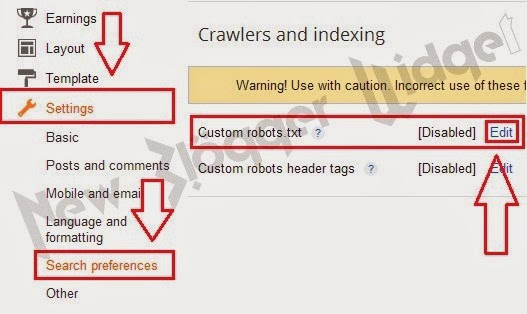
  • Go to Blogger Dashboard → Settings → Search preferences.
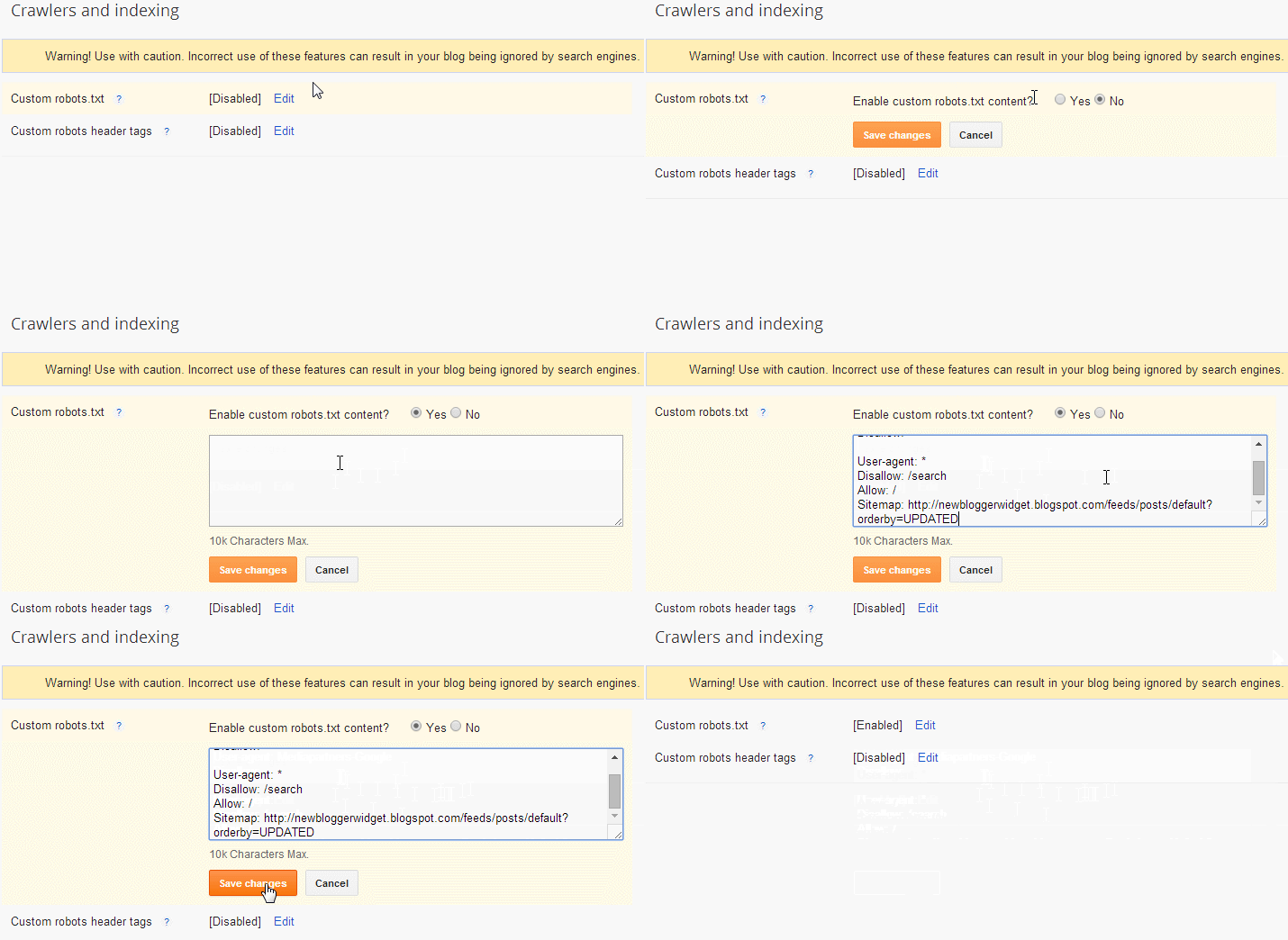
  • In Bottom Custom robots.txt section click on Edit.


  • Now a Check box will appear ,click yes and paste the bellow code (see above image).

User-agent: Mediapartners-Google
Disallow:
User-agent: *
Disallow: /search
Allow: /
Sitemap: http://yourblogurl.blogspot.com/feeds/posts/default?orderby=UPDATED

Customize :

  • Replace Red URL with your blog URL.
  • Then save it.

Read More

Add CSS3 Floating Google Search Bar for Blogger

No comments:

CSS3 Floating Google Search Bar

Today I am going to share Floating fixed CSS3 animated styled search bar for blogger.This is not the real Google search bar, this is a CSS3 styled search bar using Blogger's method.

   »»»»»»»»»»→Demo Right top Side of this blog←««««««««««

Also Read : Add Stylish Marquee Notification Bar to Blogger

Follow this step to add search bar to blogger :

  • Go to Blogger Dashboard → Layout → Add a Gadget → Select HTML/JavaScript.
  • Now copy bellow code and paste inside content box.(Leave the title as blank)

<!-- Google search box by New Blogger Widget -->
    <div class='nbw-searchbox' id='nbw-searchbox'>
      <form action='/search' id='nbw-searchform' method='get'>
        <input id='s' name='q' onblur='if (this.value == &quot;&quot;) {this.value = &quot;Search...&quot;;}' onfocus='if (this.value == &quot; Search...&quot;) {this.value = &quot;&quot;}' type='text' value='Search...'/>
        <button id='sbutton' type='submit'>
          <span id='simg'/>
        </span></button>
      </form>
    </div>
<style type="text/css">
#sbutton {
background: -moz-linear-gradient(center top , #4D90FE 0%, #4787ED 100%) repeat scroll 0pt 0pt transparent;background: -webkit-gradient(linear, left top, left bottom, color-stop(0%,#4d90fe), color-stop(100%,#4787ed));
background: -webkit-linear-gradient(top, #4d90fe 0%,#4787ed 100%);
background: -o-linear-gradient(top, #4d90fe 0%,#4787ed 100%);
background: -ms-linear-gradient(top, #4d90fe 0%,#4787ed 100%);
background: linear-gradient(top, #4d90fe 0%,#4787ed 100%);background-color: #4d90fe;
border: 1px solid #3079ED;
border-radius: 2px 2px 2px 2px;
color: #FFFFFF;
height: 27px;
min-width: 76px;
padding: 0 21px;padding-bottom: 2px;
}
#sbutton:hover{ background-color: #357AE8;
background-image: -moz-linear-gradient(center top , #4D90FE, #357AE8);background: -webkit-gradient(linear, left top, left bottom, color-stop(0%,#4d90fe), color-stop(100%,#357ae8));
background: -webkit-linear-gradient(top, #4d90fe 0%,#357ae8 100%);
background: -o-linear-gradient(top, #4d90fe 0%,#357ae8 100%);
background: -ms-linear-gradient(top, #4d90fe 0%,#357ae8 100%);
background: linear-gradient(top, #4d90fe 0%,#357ae8 100%);
border: 1px solid #2F5BB7;
box-shadow: 0 1px 1px rgba(0, 0, 0, 0.1);}
#simg {
background: url("https://blogger.googleusercontent.com/img/b/R29vZ2xl/AVvXsEgQWrs1hxoizjAFR4iaUzXG_lD3JP3sX7pRkOZizlJhhgdsgwpisiI1m46rSYO6-nh7GLxkUK1hYEH3Wdx4m3VzmTzOV5w6kOGf-COa0X2IvaVGMctvVCPUFXqHFI_04vBLff0-6V-p3no/s1600/nbwsearchicon.png") no-repeat scroll 0 0 transparent;
display: inline-block;
height: 14px;
margin: 0;
width: 17px;z-index:101;
}#s:hover {box-shadow: 0 1px 2px #C1C1C1 inset;}
#s {border: 1px solid #BCBCBC;border-radius: 4px 4px 4px 4px;font: italic 14px times New Roman;padding: 4px 2px;width: 146px; -moz-transition: width 0.2s ease-in 0s; -webkit-transition: width 0.2s ease-in; -o-transition: width 0.2s ease-in;}
#s:focus {width: 200px;}
.nbw-searchbox {
display: block;
position: fixed;
right: 0;
top: 1%;
max-width: 300px;min-width: 238px;
z-index: 100;
}
</style>
<!-- Google search box by New Blogger Widget -->

  • Now save it you done!.

If this article will help you little then share it ,If you have any problem/complaint with this post comment below.

Read More

Add Flying Letters below Mouse Pointer in Blogger

2 comments:


Welcome to New Blogger Widget,Today I am going to share Flying Letters bellow Mouse pointer animation.This a simple article that Spice your Blog.After adding this code in your blog .Your blog will be more beautiful.When you move mouse over your Blog, you will see that Letters you SET in the below code will flying like a Animation text.


Also Read : Awesome CSS3 Social Profile Widget with Zooming and Shrinking Effect for Blogger

Follow this step to add this :

  • Go to Blogger Dashboard → Template → Edit HTML.
  • Now search bellow code.
</body>


  • Now paste the bellow code above </body>.


<script type="text/javascript">
var text=&#39; ENTER YOUR FLYING TEXT HERE &#39;;
</script>
<script src="https://googledrive.com/host/0B5gFqOZt0TRhS2xZc1dQLVM3Skk" type="text/javascript">
</script>


  • Save your template.
  • CONGRATULATION ! you done.


Read More

Customize Bullet List Style With Image Hover Effect In Blogger

2 comments:


Today we will learn how to change the bullet list using the Image Hover effect.Every blogger wants to create her post in a unique way,that why they always try to make some different.To add this effect you just have to put some CSS code in your template.

Also Read : How to Optimize blog post title to H1 tags for better SEO 2014.


How to customize Bullet list in blogger :

  • Go to Blogger Dashboard → Template → Edit HTML.
  • Find bellow code,

]]></b:skin>


  • Now add bellow code just above ]]></b:skin>.


.post ul {list-style:none;
}
.post ul li {
    line-height: 1.4em;
        background: transparent url(https://blogger.googleusercontent.com/img/b/R29vZ2xl/AVvXsEiuoDzv9IwJKUtOuH69PGTxQB53yRRmr2Njx85aeaDWaOhvmt-VYYmW9ZRjIKfYlO3CuvIE41Pk8Ex9edMSXFqc0W_a2gekvHCW3QzFS5BkNeVxCSpfeNBVJ7XEOOueCy9v__QGiPI9uV0/s1600/255.gif) no-repeat scroll 0px 4px;
    margin: 0.3em 0;
    padding: 0 0 0.8em 20px;
}
.post ul li:hover {
        background: transparent
url(
https://blogger.googleusercontent.com/img/b/R29vZ2xl/AVvXsEh52piir5nOiboq8d9TxdaJlORozrcsI0PYt_YEaqzyMzvpS_wfMjwtNcgDj8wPwfhaKMd0sQZenKzwrmxfDazxh5CU0ksNUui3I41k4pyTFZDIR9ZOhFvEkMg290rGpzcFnxdHbk7Z1GY/s1600/251.gif) no-repeat scroll 0px 4px;
}


  • Now save your Template and you are done.

Costomizations:

  • You can also Replace highlighted image url with your choice.
Read More

How to Submit Blogger Sitemap to Google Webmaster Tools

No comments:

Submit Blogger Sitemap to Google Webmaster Tools


If you want successful in your blogging career you must have to generate organic traffic to your blog.If you are a new in blogger then you should aware with the Google Webmaster Tools.Now it's time to work with off page Blogger SEO which is most important.we will do many things but in the today's post we're going to submit blogger sitemap to Google.You must be thinking that How it is most important ? So, this is really important. Just read this complete post and then ask yourself that it is really important ?.This is a great tool which is provided by Google itself. It is useful for new bloggers to get Index in Google Web Master tools.

Also Read : How To Host JavaScript And CSS Scripts On Google Drive.

Follow this step to submit sitemap :

  • Go to Google Webmaster Tools Dashboard.
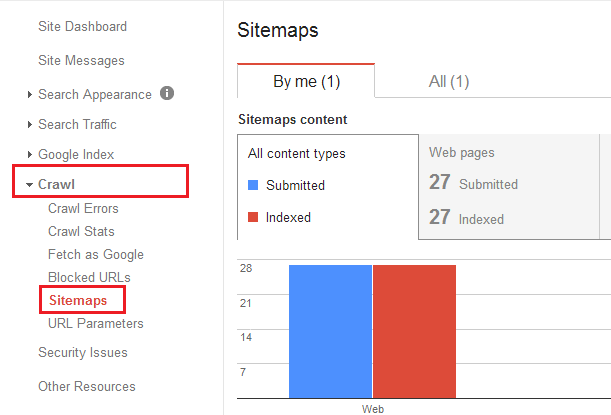
  • Click on Crawl → sitemaps

  • Now click on "Add/Test Sitemap"


  • Now box will appear the copy the below code and paste in the box,

  • Now press "Submit Sitemap"
atom.xml?redirect=false&start-index=1&max-results=500

Note :

  • Above code is for 1-500 post,if you have more then 500 post then add bellow code.
atom.xml?redirect=false&start-index=500&max-results=1000 

  • CONGRATULATIONS ! You've Successfully submitted Sitemap to Google.When your sitemap is successfully indexed then you will see your posts showing in search results. But one thing Google shows those posts on top which are unique and quality. So try to make your blog's posts more unique and quality to drive more traffic from Google.


Read More

How To Optimize Blogger Title SEO Friendly For Higher Search Results

2 comments:

 Today I am Sharing How to make blogger Title SEO Friendly.Page title is the most important element in your blog in terms of ranking high in search engines.

In Blogger default template display your blog title in front of post title,so page title normally show as :


After Optimizing the blog title,it will show like this :


So having the post titles at the beginning your blog chance to found. 


Also Read : How to add Meta Tags in Blogger 2014.

Follow this step to optimize blog title :

  • Go to Blogger Dashboard → Template → Edit HTML.
  • Find bellow code
<title><data:blog.pageTitle/></title>

  • Now Replace above code with bellow code
<b:if cond='data:blog.pageType == &quot;index&quot;'>
<title><data:blog.pageTitle/></title>
<b:else/>
<title><data:blog.pageName/> | <data:blog.pageTitle/></title>
</b:if>

  • Now Save your Template
  • You done all !.

Read More

Add a Custom 404 Page Not Found for Blogger

1 comment:

Custom 404 Page Not Found for Blogger


In this post i will teach How to enable custom 404 Error page for blogger. This SEO custom 404 page appears only when a reader visit a page that does not exist or deleted.In the past with old Blogger interface we're unable to create a custom error page but now it's possible because now that option is also available in search preferences settings.You can create a custom error page as per your blog design and creativity.Those who don't know about 404 Error page can read the below post to understand it.


Also Read : How to Add Support us Widget for Blogger. 


Follow this step :

  • Go to Blogger → Setting → Search Preference


  • Now under Error and redirections you can find Custom Page Not Found. 
  • Click on edit option.


  • Now a box will appear,In the box paste the bellow code.


<style>
#error-page {
    background: #007dbd;
    background: url(https://blogger.googleusercontent.com/img/b/R29vZ2xl/AVvXsEilFPprKClCIsxfdw98v1S6ZOgteX4o0eZjY-k5oI0rxEaZemNj_aHOSqIBxprYHg6obS0w9UXg9zbUvTWGvjNB0kKkvg9ue0UViemo09DdEy0ppgF_WpQ2G9Gzm0vc4icXsfvvEgcv2-k/s1600/nbw404.gif)no-repeat top center,-moz-radial-gradient(center 40%, circle cover, #007dbd 0%, #003650 100%);
    background: url(https://blogger.googleusercontent.com/img/b/R29vZ2xl/AVvXsEhb090UZDqSAdTpJnkMF4M9T47QkMuG4BLqB3HY8Nv_4Mxh_PCJOX0sOwM2e-BaWqw5vDnx0_rLK_lZ6VFhGh_hvJeIfldXCiKuRuKzhZajvGVd-vsLkdeSGqKPX213wcVrkZgbMPEQ16A/s1600/nbw-404.gif)no-repeat top center,-webkit-gradient(radial, center 40%, 0,  center 40%, 800, from(#007dbd), to(#003650) );  
        text-align:center;
        position:fixed;
        top:0px;
        right:0px;
        bottom:0px;
        left:0px;
        padding-top:270px;
        z-index:999999;
}
#error-page  h1 {
        font-size:540px!important;
        position:absolute;
        font-family:impact,sans serif!important;
        top:70px;
        left:50%;
        letter-spacing: -8px;
        margin-left:-502px!important;
        width:960px;
        z-index:-2;
        color:rgba(0,0,0,.09)!important;
}
#error-page  h2 {
        font-family:arial black,sans serif!important;
        text-transform:uppercase;
        font-size:80px;
        line-height:66px!important;
        letter-spacing: -3px;
        color:#fff!important;
        margin:0!important;
        padding:0!important;
}
#error-page p a,
#error-page p a:visited,
#error-page p a:hover{
        font-family:arial black,sans serif!important;
        text-transform:uppercase;
        font-size:56px;
        line-height:40px!important;
        border:none;
        font-weight: bold;
        color:rgba(0,0,0,.5)!important;
        margin:0!important;
        padding:0!important;
        text-decoration:none!important;
}
</style>
<div id='error-page'>
 <h1>404</h1> <h2>LINK BROKEN</h2>
 <h2>PAGE NOT FOUND</h2>
 <p> <a href='/' title='Home Page'> Back to Home Page</a></p>
</div>


  • Now Save it and enjoy


Read More

How to Add Next & Previous Numbered Pagination in Blogger

2 comments:

Add Next & Previous Numbered Pagination in Blogger


Blogger is much advanced instead of any other platform because blogger provide everything that you want. You can upload your desire template and make different type of changes in it and you can also make widgets and use them on your blog.Easy user interface is one of the most important feature that every blogger wants in their blogs. It actually help the users to browse the blog easily.


Follow this step :


  • Go to Blogger → Template → Edit HTML (before editing backup your template).
  • Search For </body>
  • Now Paste the bellow code Above </body>.


<b:if cond='data:blog.pageType != &quot;item&quot;'>
<b:if cond='data:blog.pageType != &quot;static_page&quot;'>
<script type='text/javascript'>
  /*<![CDATA[*/
var postperpage=5;
var numshowpage=2;
var upPageWord ='« Previous Page';
var downPageWord ='Next Page »';
var urlactivepage=location.href;
var home_page="/";
  /*]]>*/
</script>
<script type='text/javascript'>
  /*<![CDATA[*/
    var nopage;var jenis;var nomerhal;var lblname1;halamanblogger();function loophalaman(banyakdata){var html='';nomerkiri=parseInt(numshowpage/2);if(nomerkiri==numshowpage-nomerkiri){numshowpage=nomerkiri*2+1}mulai=nomerhal-nomerkiri;if(mulai<1)mulai=1;maksimal=parseInt(banyakdata/postperpage)+1;if(maksimal-1==banyakdata/postperpage)maksimal=maksimal-1;akhir=mulai+numshowpage-1;if(akhir>maksimal)akhir=maksimal;html+="<span class='showpageOf'>Page "+nomerhal+' of '+maksimal+"</span>";var prevnomer=parseInt(nomerhal)-1;if(nomerhal>1){if(nomerhal==2){if(jenis=="page"){html+='<span class="showpage"><a href="'+home_page+'">'+upPageWord+'</a></span>'}else{html+='<span class="showpageNum"><a href="/search/label/'+lblname1+'?&max-results='+postperpage+'">'+upPageWord+'</a></span>'}}else{if(jenis=="page"){html+='<span class="showpageNum"><a href="#" onclick="redirectpage('+prevnomer+');return false">'+upPageWord+'</a></span>'}else{html+='<span class="showpageNum"><a href="#" onclick="redirectlabel('+prevnomer+');return false">'+upPageWord+'</a></span>'}}}if(mulai>1){if(jenis=="page"){html+='<span class="showpageNum"><a href="'+home_page+'">1</a></span>'}else{html+='<span class="showpageNum"><a href="/search/label/'+lblname1+'?&max-results='+postperpage+'">1</a></span>'}}if(mulai>2){html+=' ... '}for(var jj=mulai;jj<=akhir;jj++){if(nomerhal==jj){html+='<span class="showpagePoint">'+jj+'</span>'}else if(jj==1){if(jenis=="page"){html+='<span class="showpageNum"><a href="'+home_page+'">1</a></span>'}else{html+='<span class="showpageNum"><a href="/search/label/'+lblname1+'?&max-results='+postperpage+'">1</a></span>'}}else{if(jenis=="page"){html+='<span class="showpageNum"><a href="#" onclick="redirectpage('+jj+');return false">'+jj+'</a></span>'}else{html+='<span class="showpageNum"><a href="#" onclick="redirectlabel('+jj+');return false">'+jj+'</a></span>'}}}if(akhir<maksimal-1){html+='...'}if(akhir<maksimal){if(jenis=="page"){html+='<span class="showpageNum"><a href="#" onclick="redirectpage('+maksimal+');return false">'+maksimal+'</a></span>'}else{html+='<span class="showpageNum"><a href="#" onclick="redirectlabel('+maksimal+');return false">'+maksimal+'</a></span>'}}var nextnomer=parseInt(nomerhal)+1;if(nomerhal<maksimal){if(jenis=="page"){html+='<span class="showpageNum"><a href="#" onclick="redirectpage('+nextnomer+');return false">'+downPageWord+'</a></span>'}else{html+='<span class="showpageNum"><a href="#" onclick="redirectlabel('+nextnomer+');return false">'+downPageWord+'</a></span>'}}var pageArea=document.getElementsByName("pageArea");var blogPager=document.getElementById("blog-pager");for(var p=0;p<pageArea.length;p++){pageArea[p].innerHTML=html}if(pageArea&&pageArea.length>0){html=''}if(blogPager){blogPager.innerHTML=html}}function hitungtotaldata(root){var feed=root.feed;var totaldata=parseInt(feed.openSearch$totalResults.$t,10);loophalaman(totaldata)}function halamanblogger(){var thisUrl=urlactivepage;if(thisUrl.indexOf("/search/label/")!=-1){if(thisUrl.indexOf("?updated-max")!=-1){lblname1=thisUrl.substring(thisUrl.indexOf("/search/label/")+14,thisUrl.indexOf("?updated-max"))}else{lblname1=thisUrl.substring(thisUrl.indexOf("/search/label/")+14,thisUrl.indexOf("?&max"))}}if(thisUrl.indexOf("?q=")==-1&&thisUrl.indexOf(".html")==-1){if(thisUrl.indexOf("/search/label/")==-1){jenis="page";if(urlactivepage.indexOf("#PageNo=")!=-1){nomerhal=urlactivepage.substring(urlactivepage.indexOf("#PageNo=")+8,urlactivepage.length)}else{nomerhal=1}document.write("<script src=\""+home_page+"feeds/posts/summary?max-results=1&alt=json-in-script&callback=hitungtotaldata\"><\/script>")}else{jenis="label";if(thisUrl.indexOf("&max-results=")==-1){postperpage=20}if(urlactivepage.indexOf("#PageNo=")!=-1){nomerhal=urlactivepage.substring(urlactivepage.indexOf("#PageNo=")+8,urlactivepage.length)}else{nomerhal=1}document.write('<script src="'+home_page+'feeds/posts/summary/-/'+lblname1+'?alt=json-in-script&callback=hitungtotaldata&max-results=1" ><\/script>')}}}function redirectpage(numberpage){jsonstart=(numberpage-1)*postperpage;nopage=numberpage;var nBody=document.getElementsByTagName('head')[0];var newInclude=document.createElement('script');newInclude.type='text/javascript';newInclude.setAttribute("src",home_page+"feeds/posts/summary?start-index="+jsonstart+"&max-results=1&alt=json-in-script&callback=finddatepost");nBody.appendChild(newInclude)}function redirectlabel(numberpage){jsonstart=(numberpage-1)*postperpage;nopage=numberpage;var nBody=document.getElementsByTagName('head')[0];var newInclude=document.createElement('script');newInclude.type='text/javascript';newInclude.setAttribute("src",home_page+"feeds/posts/summary/-/"+lblname1+"?start-index="+jsonstart+"&max-results=1&alt=json-in-script&callback=finddatepost");nBody.appendChild(newInclude)}function finddatepost(root){post=root.feed.entry[0];var timestamp1=post.published.$t.substring(0,19)+post.published.$t.substring(23,29);var timestamp=encodeURIComponent(timestamp1);if(jenis=="page"){var alamat="/search?updated-max="+timestamp+"&max-results="+postperpage+"#PageNo="+nopage}else{var alamat="/search/label/"+lblname1+"?updated-max="+timestamp+"&max-results="+postperpage+"#PageNo="+nopage}location.href=alamat}
  /*]]>*/
</script>
</b:if>
</b:if>

  • Now Search ]]></b:skin>
  • Now paste the code of your choice above ]]></b:skin> .

//* Red Style ---------------------------------------- *//
#blog-pager{float:left;font-size:16px;line-height:normal;margin:0 20px;padding:2em 0}
.showpageNum a,.showpage a,.showpagePoint{background:#e74c3c;border:none;border-bottom:3px solid #862B20;color:#FFF;font-size:15px;font-family:open sans;font-weight:700;margin-left:10px;border-radius:5px 5px 5px 5px;-webkit-border-radius:5px 5px 5px 5px;-moz-border-radius:5px;-o-border-radius:5px 5px 5px 5px;transition:background 400ms;-webkit-transition:background 400ms;-moz-transition:background 400ms;-o-transition:background 400ms;padding:10px 20px}
.showpageNum a:hover,.showpage a:hover,.showpagePoint,.blog-pager-newer-link,.blog-pager-older-link,.home-link{background:#c0392b;color:#FFF}
.showpageOf{display:none!important}
@font-face{font-family:'font-style:normal;font-weight:700;src:local('OpenSansBold'), local('OpenSans-Bold'), url(http://themes.googleusercontent.com/static/fonts/opensans/v8/k3k702ZOKiLJc3WVjuplzHhCUOGz7vYGh680lGh-uXM.woff) format('woff')}

//* Blue Style --------------------------------------------------- *//
#blog-pager{float:left;font-size:16px;line-height:normal;margin:0 20px;padding:2em 0}
.showpageNum a,.showpage a,.showpagePoint{background:#3498db;border:none;border-bottom:3px solid #246EA0;color:#FFF;font-size:15px;font-family:open sans;font-weight:700;margin-left:10px;border-radius:5px 5px 5px 5px;-webkit-border-radius:5px 5px 5px 5px;-moz-border-radius:5px;-o-border-radius:5px 5px 5px 5px;transition:background 400ms;-webkit-transition:background 400ms;-moz-transition:background 400ms;-o-transition:background 400ms;padding:10px 20px}
.showpageNum a:hover,.showpage a:hover,.showpagePoint,.blog-pager-newer-link,.blog-pager-older-link,.home-link{background:#2980b9;color:#FFF}
.showpageOf{display:none!important}
@font-face{font-family:'font-style:normal;font-weight:700;src:local('OpenSansBold'), local('OpenSans-Bold'), url(http://themes.googleusercontent.com/static/fonts/opensans/v8/k3k702ZOKiLJc3WVjuplzHhCUOGz7vYGh680lGh-uXM.woff) format('woff')}

// * Green Style ------------------------------------------ *//
#blog-pager{float:left;font-size:16px;line-height:normal;margin:0 20px;padding:2em 0}
.showpageNum a,.showpage a,.showpagePoint{background:#2ecc71;border:none;border-bottom:3px solid #208C4D;color:#FFF;font-size:15px;font-family:open sans;font-weight:700;margin-left:10px;border-radius:5px 5px 5px 5px;-webkit-border-radius:5px 5px 5px 5px;-moz-border-radius:5px;-o-border-radius:5px 5px 5px 5px;transition:background 400ms;-webkit-transition:background 400ms;-moz-transition:background 400ms;-o-transition:background 400ms;padding:10px 20px}
.showpageNum a:hover,.showpage a:hover,.showpagePoint,.blog-pager-newer-link,.blog-pager-older-link,.home-link{background:#27ae60;color:#FFF}
.showpageOf{display:none!important}
@font-face{font-family:'font-style:normal;font-weight:700;src:local('OpenSansBold'), local('OpenSans-Bold'), url(http://themes.googleusercontent.com/static/fonts/opensans/v8/k3k702ZOKiLJc3WVjuplzHhCUOGz7vYGh680lGh-uXM.woff) format('woff')}


  • Now save your template.
  • You're done check your blog.


Read More